Your whole content department, in one place.

From research and planning to editing and getting it posted, with a strategy bot that knows your business and an academy for your team. All of it in one app.

What’s inside

13Editing styles
401Hook structures
158Hook templates
67Backbone questions
40Content topics
37Content formats
24/7Strategy Bot
1App for all of it

13 pre-built styles.

Every one a real edit · Click one for sound
See what each style does
  • Raw Talking ReelsReels · 9:16

    Fast, honest reels: one hook card up top, then just you and captions.

  • Tool Demo ReelsReels · 9:16

    Reels that show a tool, a result or a system while you explain it.

  • Podcast ClipsReels · 9:16

    Vertical clips from a two-person talk filmed on one wide camera.

  • Clean Interview ClipsReels · 9:16

    Interviews and Q&As: a tight cut, a little B-roll and bold yellow captions.

  • Video Call ClipsReels · 9:16

    Clips from a Zoom or Meet recording that feel produced: you, a split screen and one big text card.

  • YouTube StyleYouTube · 16:9

    Horizontal YouTube videos and desk talks: B-roll every few seconds, big captions beside you, your best line full-screen.

  • Documentary StorytellingYouTube · 16:9

    Story-driven explainers: paper cut-outs, bold print type and hand-drawn marks.

  • SaaS & App ExplainerYouTube · 16:9

    Software and app explainers, step-by-step tutorials. An early look.

  • Corporate AdsYouTube · 16:9

    Company ads: angle changes on every cut, stat cards, name tags, small subtitles.

  • Personal Brand PromoYouTube · 16:9

    Bold promos for your own brand: raw open, a snap, then everything switches on.

  • Lists & StepsOn top of any edit

    Lists, steps and numbers that appear on the words you say. Quiet and premium.

  • Travel Location TagOn top of any edit

    A place or chapter tag for vlogs: a pin drops in and the name decodes out of digits.

  • Tier List RankingTier lists · 9:16

    Rank anything on an S-to-D tier list that fills in as you say each tier.

Your own look

Or build your own from scratch.

Don’t want one of the pre-built styles? Make your own, for long form or short form.

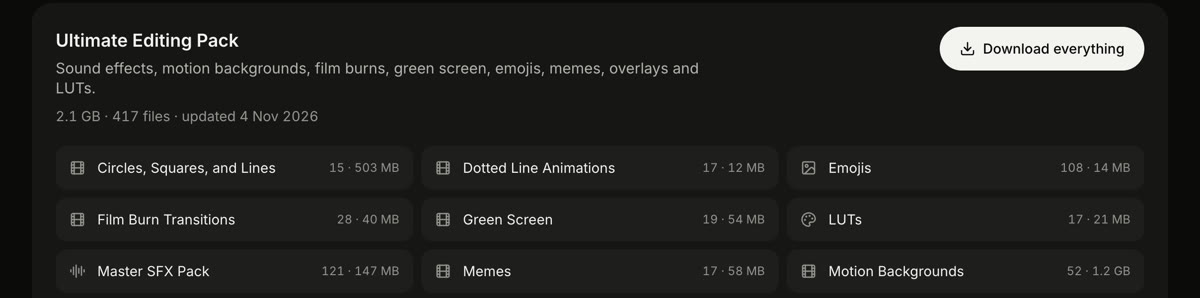
  1. Download my Ultimate Editing Pack.Sound effects, music, motion backgrounds, overlays and colour looks, in one download.
  2. Merge it with your own.Already have sounds or graphics you like? Put them in the same folder and your Claude uses both.
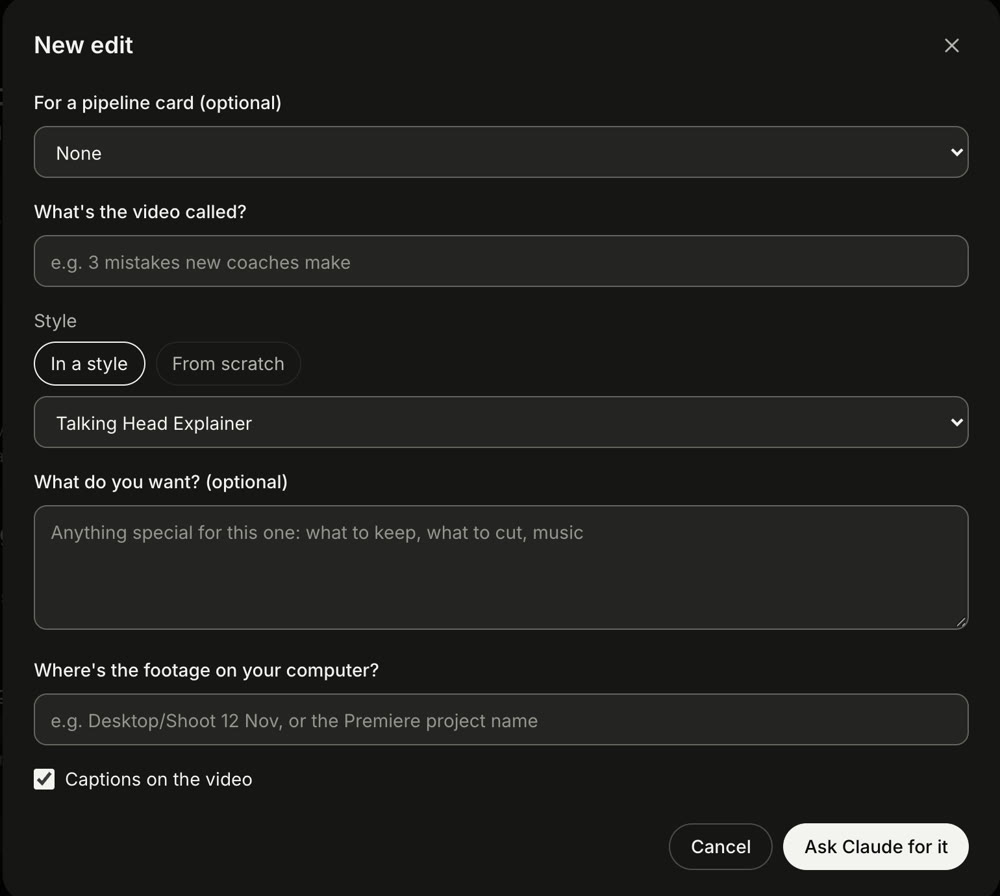
  3. Open a new edit and make it yours.Add a timeline, a picture, an animation or a graphic, and say how you want it to look.
  4. Save it as your style.Next time you just say “edit this in my style”.
The Ultimate Editing Pack: sound effects, music, motion backgrounds and more
Opening a new edit: in a style or from scratch
How it works

Answer once.
Use it everywhere.

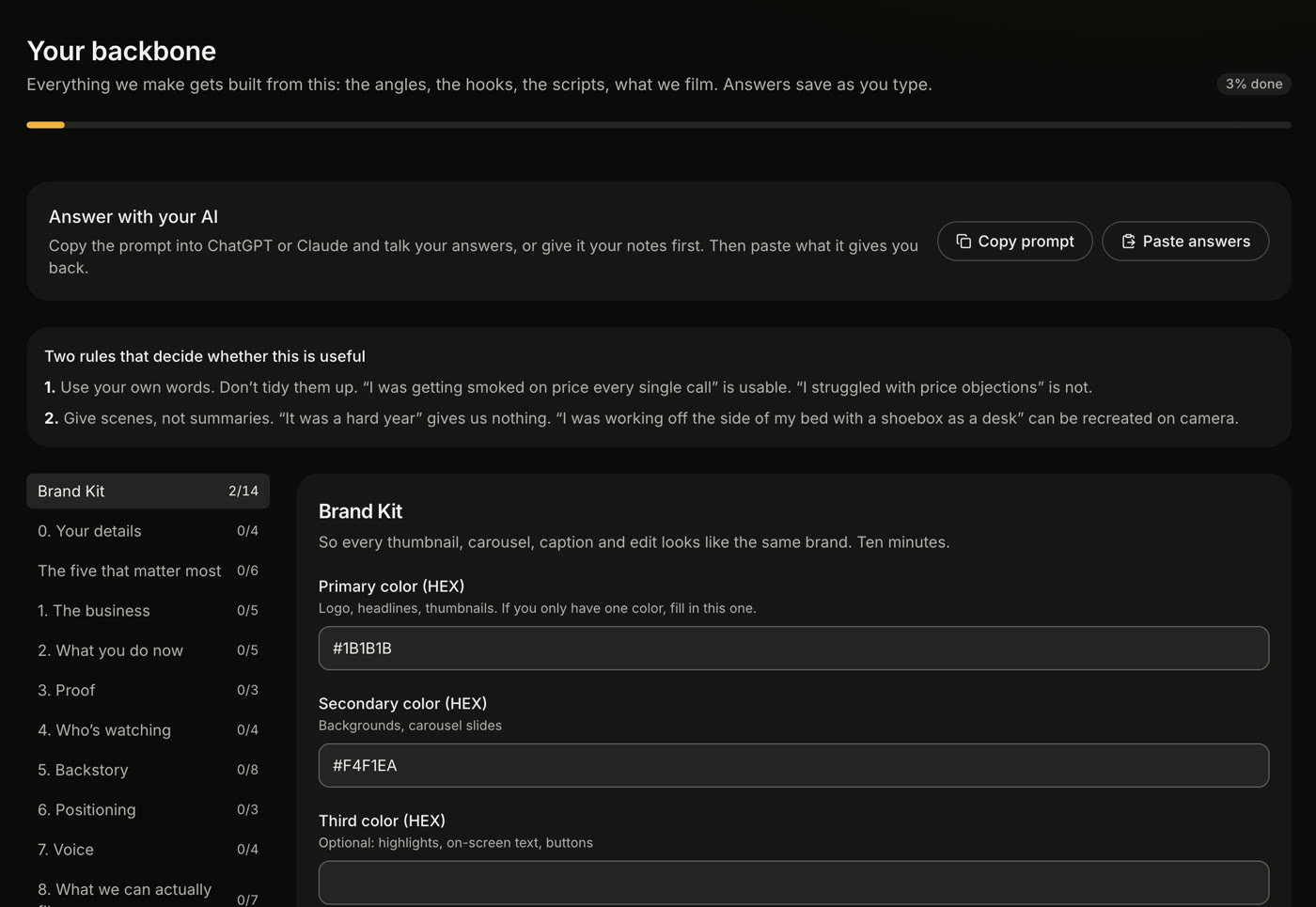
Copy the Backbone prompt into your own AI, talk through your answers, and paste back what it gives you. You answer once: what you sell, who it’s for, your story, your proof, how you talk and what you can film. From then on it learns from every question you ask the bot and every bit of context you give it, and knows you better each time.

Your Backbone in the app
Competitor research

See what works for them. Make it yours.

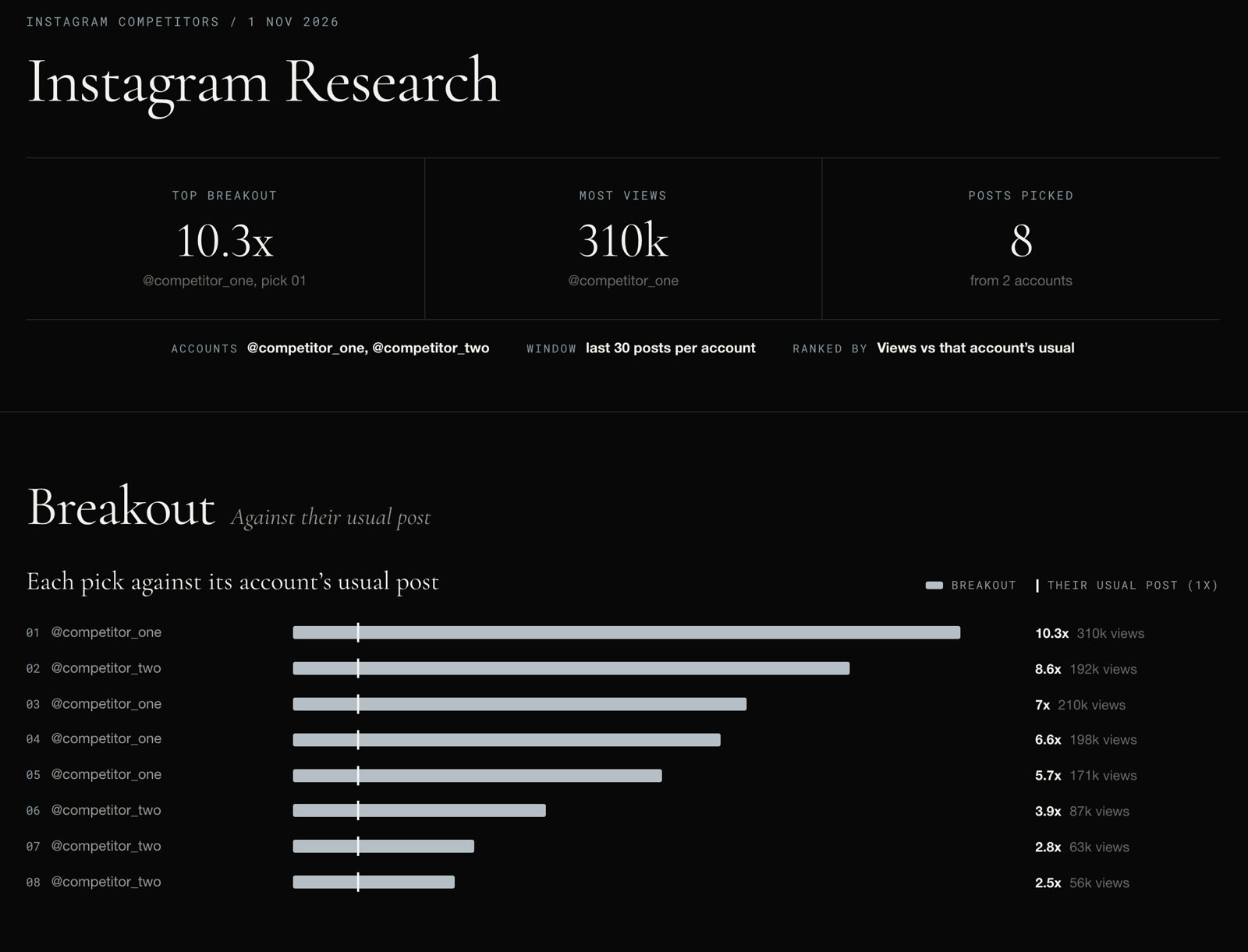
Name the accounts you’re up against. A few minutes later you get a report like this one.

  1. Name the accounts.Up to five on Instagram or YouTube, or an advertiser in the Meta Ad Library.
  2. It finds the breakouts.It reads their last 30 posts and picks the ones that beat that account’s usual views, not just the biggest numbers.
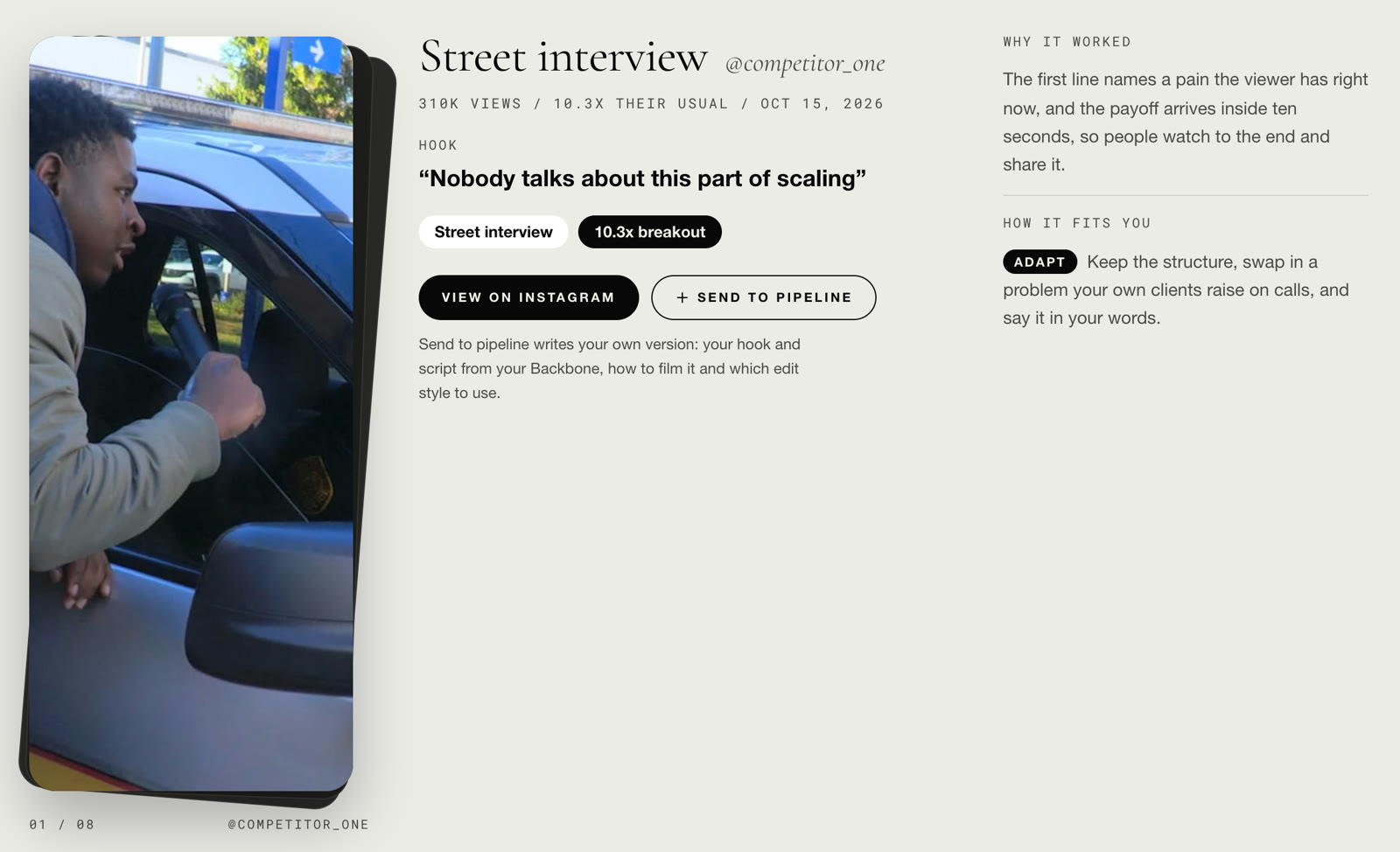
  3. It tells you why.The hook word for word, why it worked, and whether to steal it, adapt it or leave it for your business.
  4. One click, your version.Send to pipeline writes your own hook and script from your Backbone, how to film it and which style to edit it in.
A research report: the top breakout, most views, and every pick against its account’s usual post
One pick: the hook, why it worked, how it fits you, and Send to pipeline
Pipeline

Your finished videos, on your board.

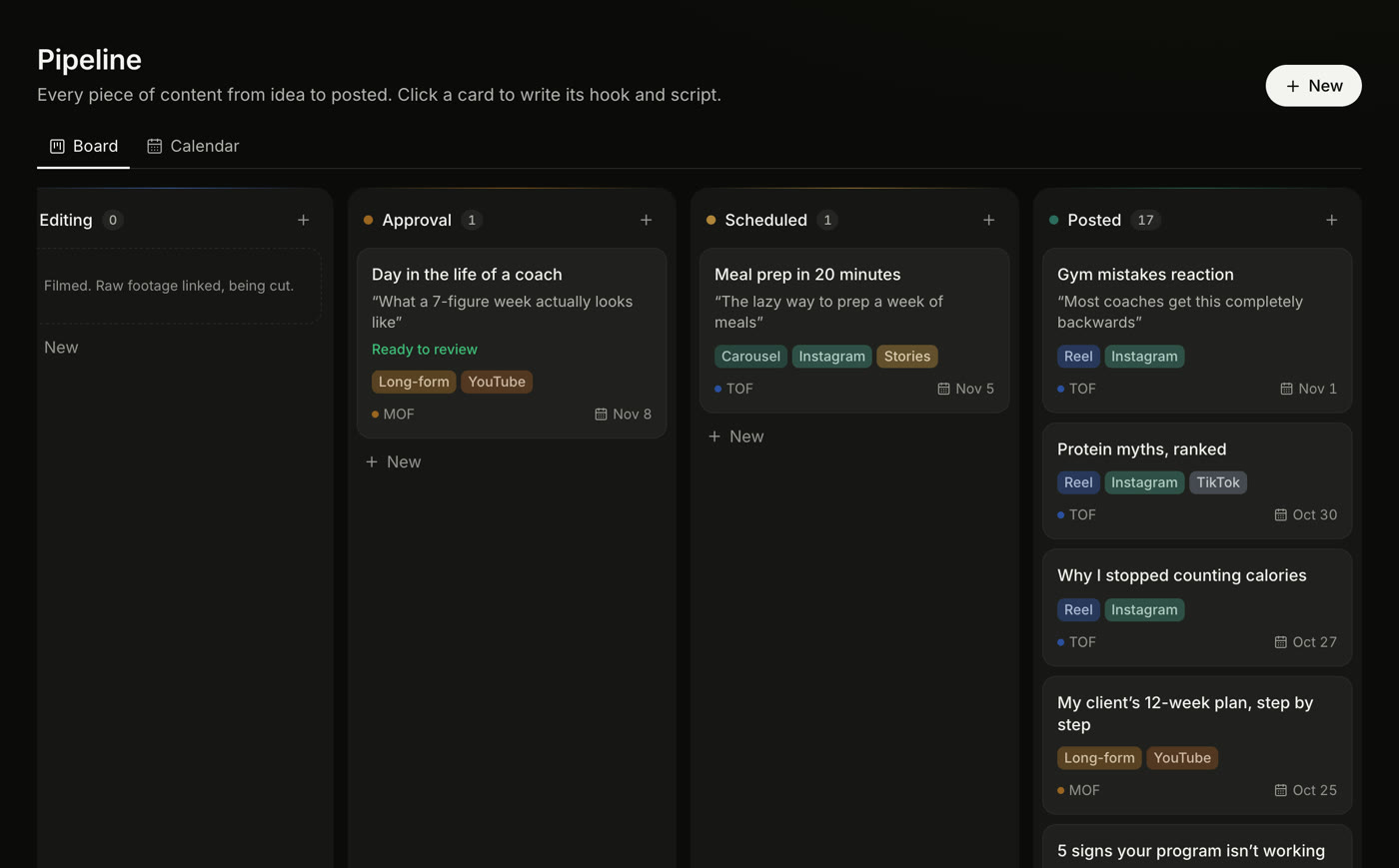
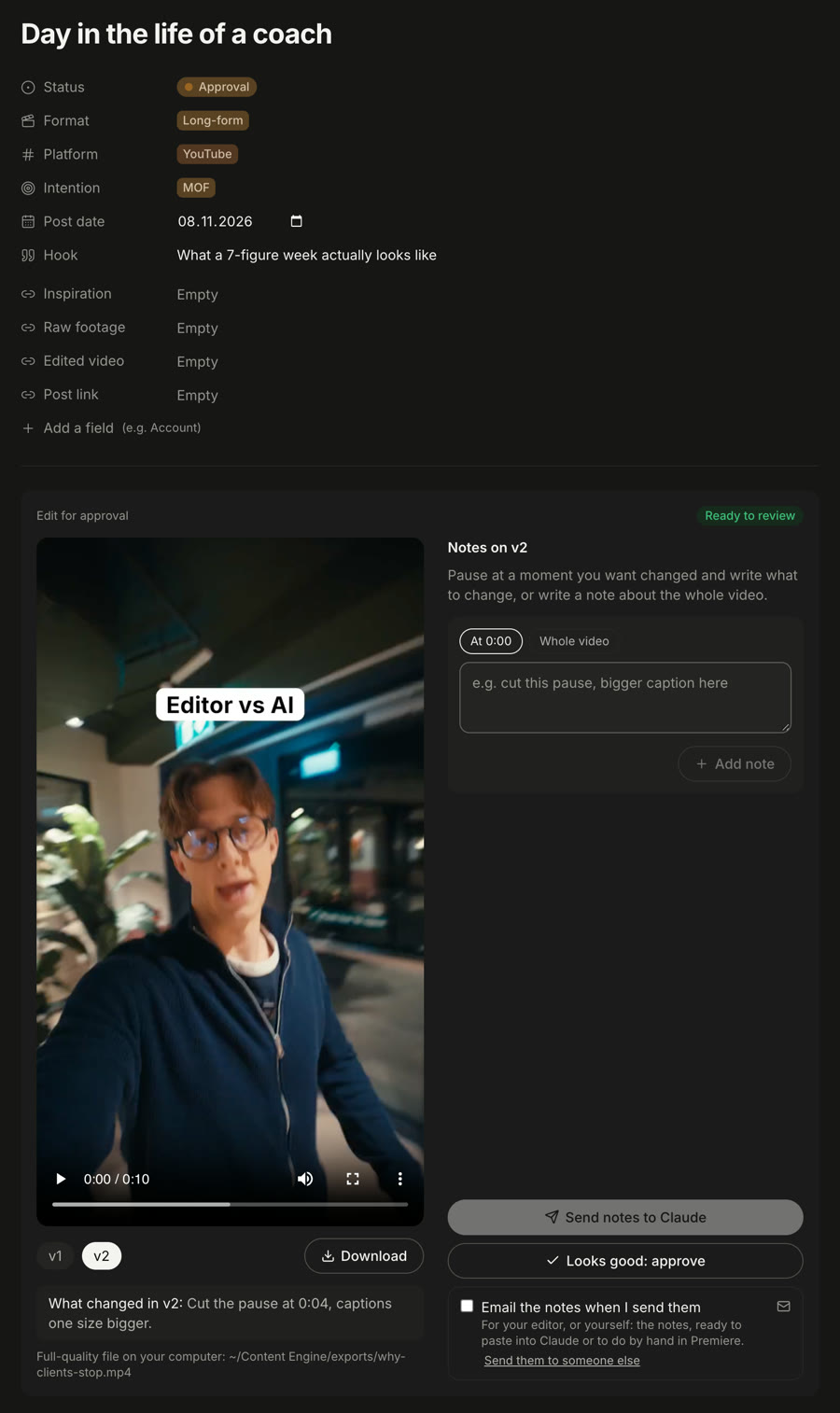
See your done videos right in your pipeline. Open the card, watch each version, leave notes on the exact second and your Claude makes the changes. Approve it and it moves to Scheduled with its caption; you get an email the morning it goes out.

The pipeline with an edit waiting in Approval
A card with the edit: versions, notes and approve

What else is inside.

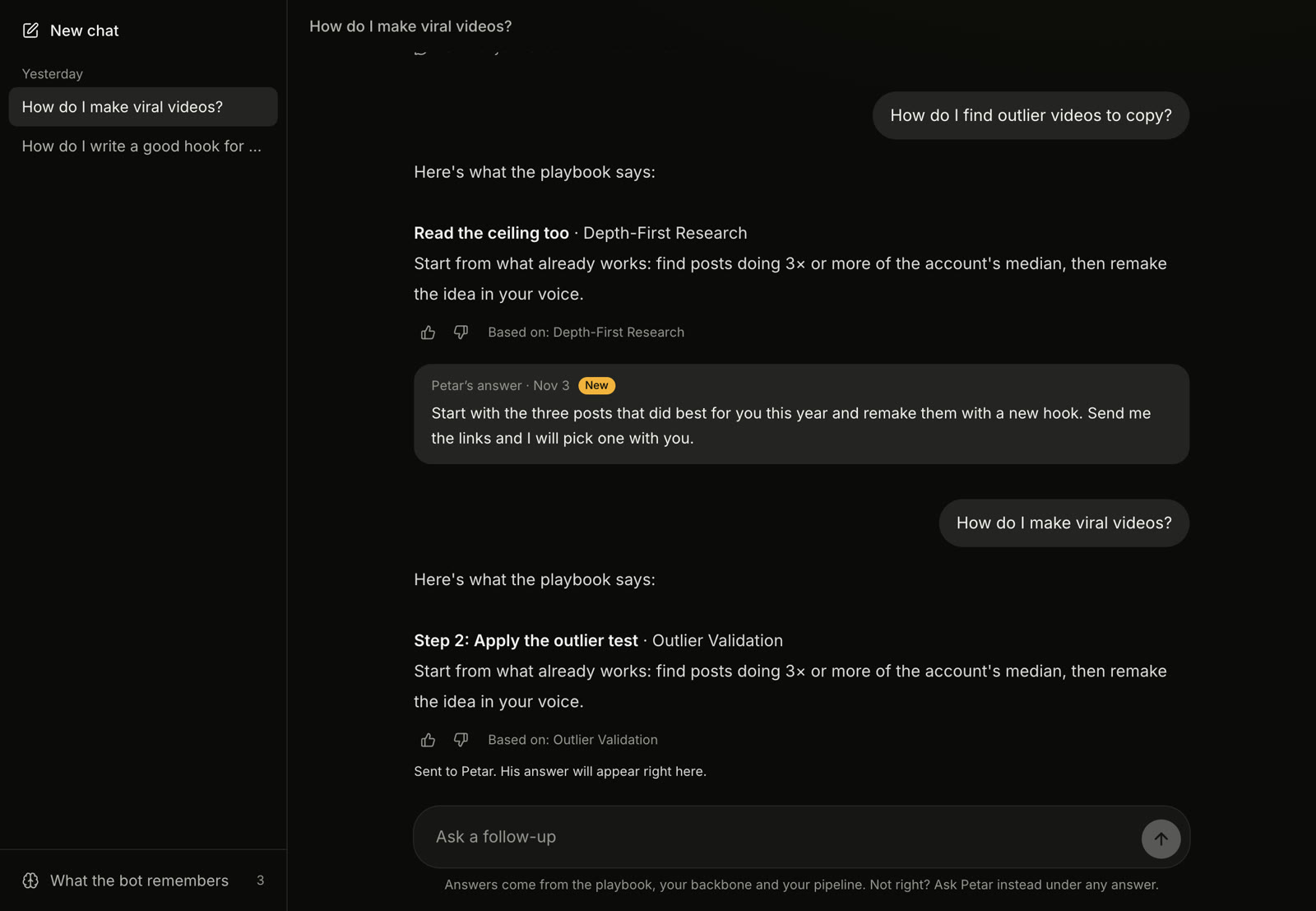
The Strategy Bot: your chats, an answer, a personal answer and what the bot remembers
Strategy Bot

10,000+ hours of knowledge in one place.

Your AI strategist. It answers from a playbook built over years of making content, and from your Backbone and your board, so every answer is about your business, not anyone’s. Ask what to post this week, for hooks or for a script. It remembers what matters about you, and if an answer isn’t right, you can ask for a personal one in the same chat.
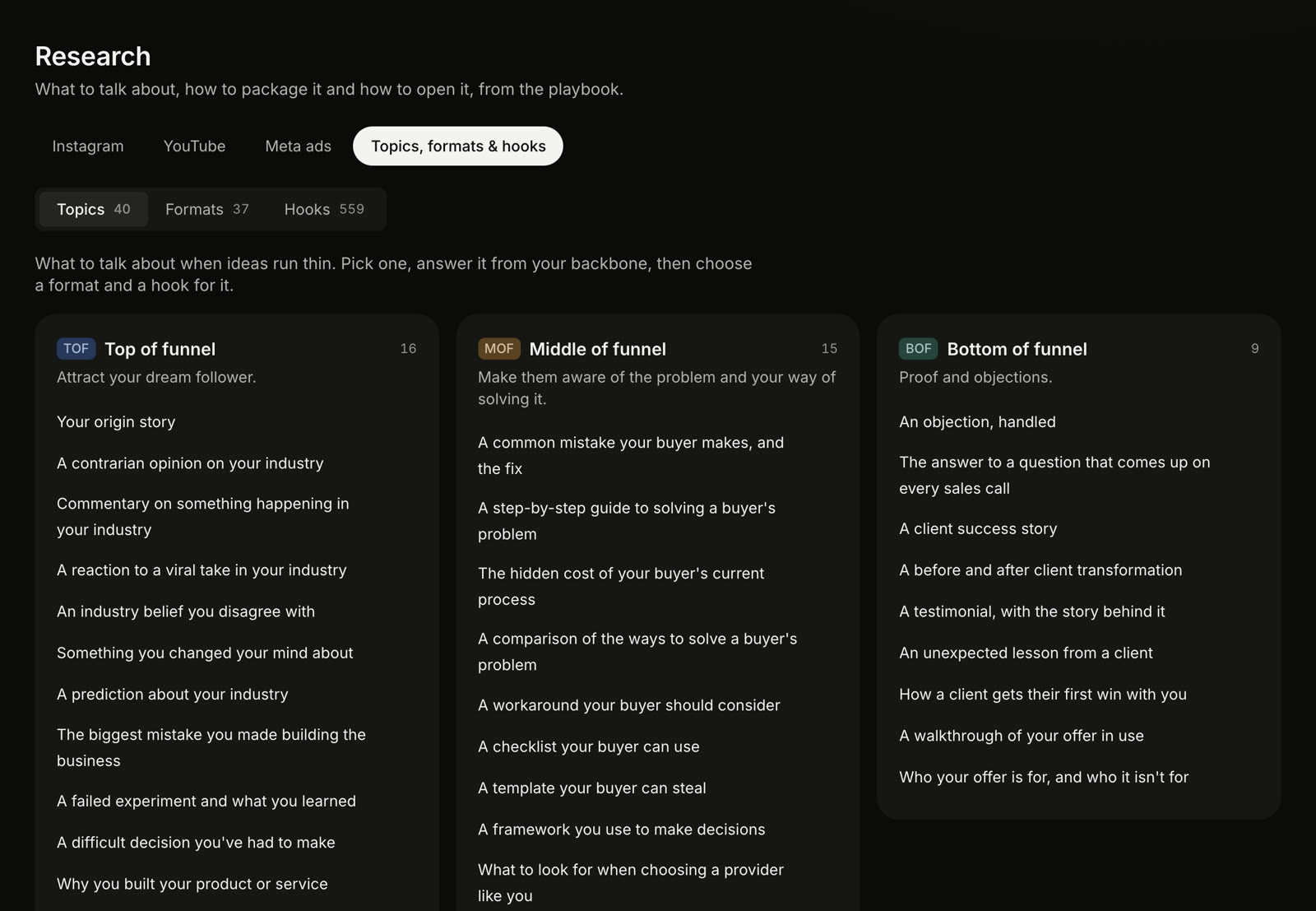
Topics, formats and hooks in Research
Formats & hooks

The library behind every idea.

40 topics, 37 content formats, 158 hook templates and 401 proven hook structures, sorted by where they sit in your funnel. Pick one and the Strategy Bot helps you turn it into a post.

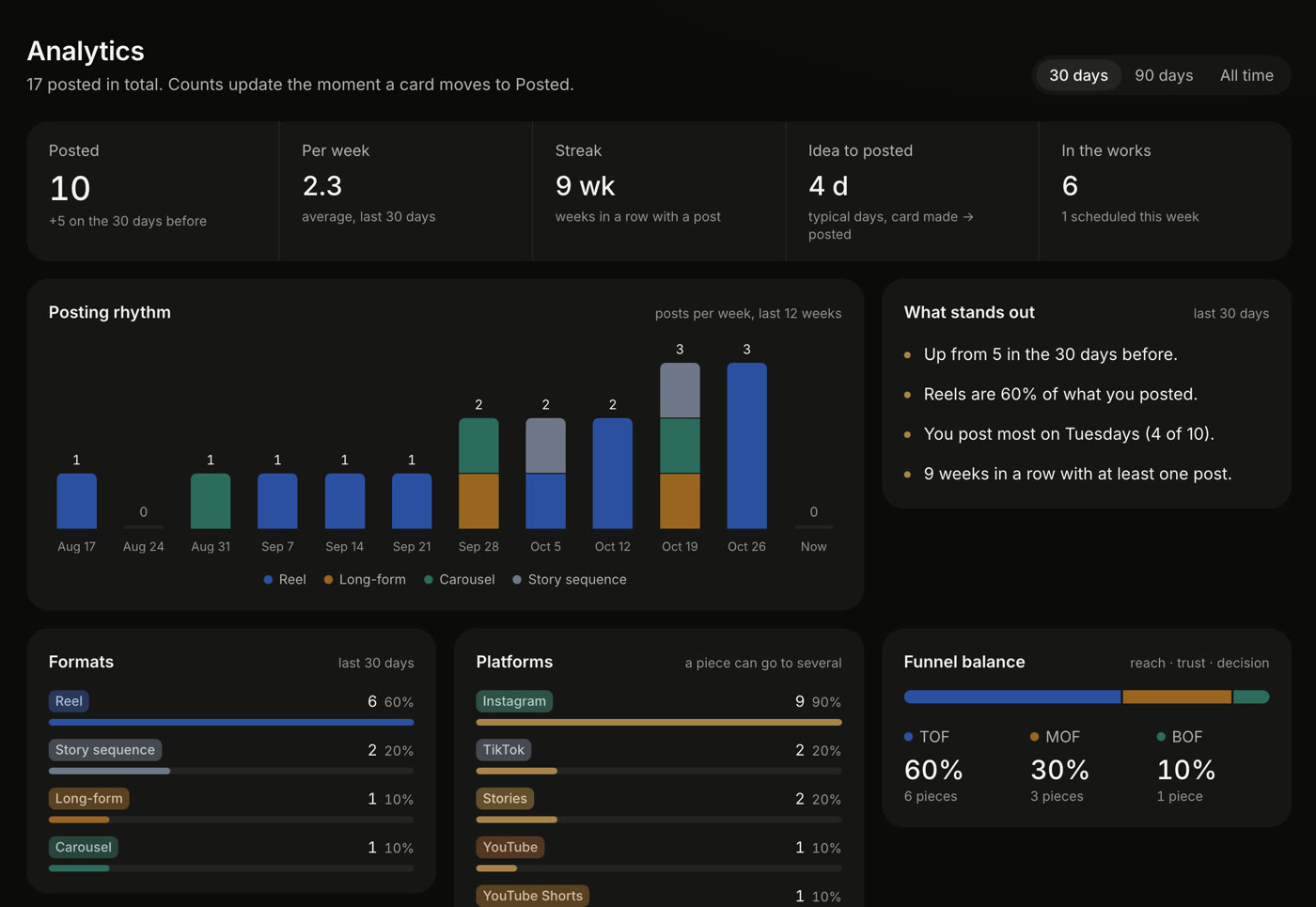
Analytics
Analytics

See what you posted, and what stands out.

Posts per week, your streak, how long an idea takes to get posted, and your mix of formats, platforms and funnel stages. Worked out from your board, so there is nothing to fill in twice.

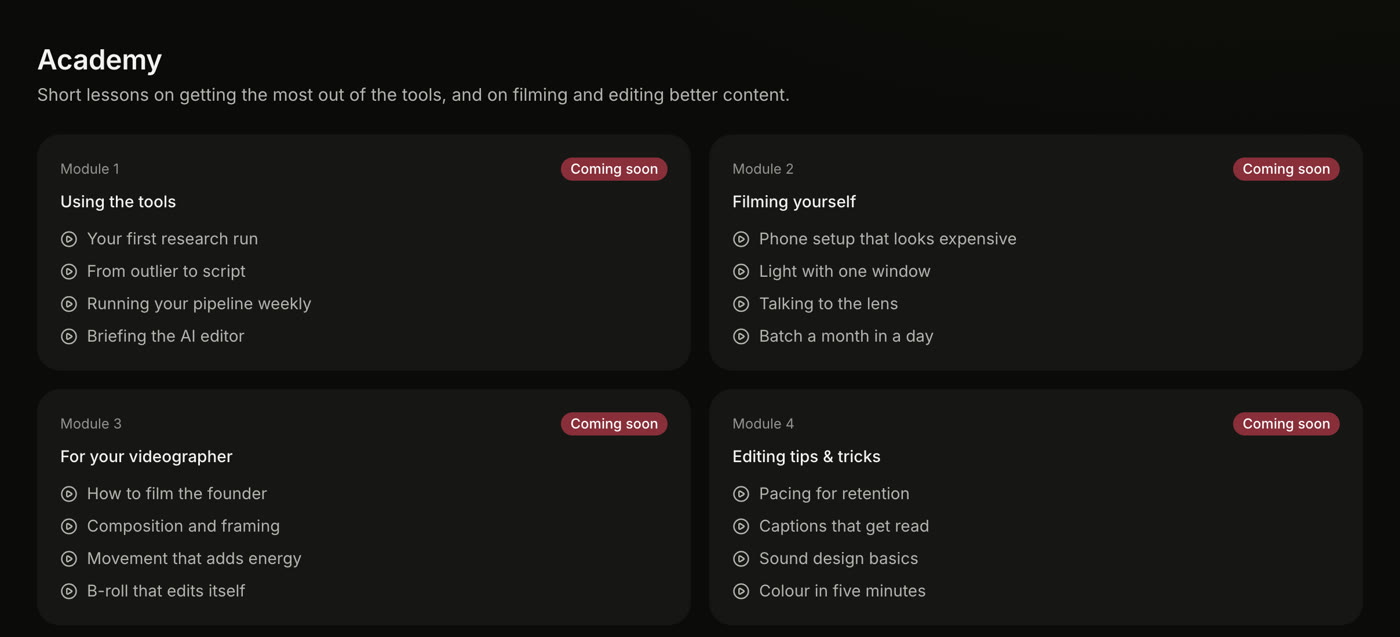
The Academy
Academy Coming soon

A full course for you and your team.

Video lessons and the tactics behind them: how to use the tools, how to film yourself, a module for your videographer, and editing tips. Get the know-how out of your head and into your team. On Max and Ultra.

Which plan is right for you?


Basic

The system, set up for you to run yourself.

Any style or from scratchEditing by your Claude
10Styles of your own
5Research reports a month
100Strategy Bot answers a month
Backbone, pipeline and analytics
Formats, hooks and editing pack
Academy (coming soon)
Strategy calls
Best for most

Max

The whole system, running in your business.

Any style or from scratchEditing by your Claude
30Styles of your own
8Research reports a month
300Strategy Bot answers a month
Backbone, pipeline and analytics
Formats, hooks and editing pack
Academy (coming soon)
Strategy calls
 

Ultra

Everything, plus a month of weekly strategy calls.

Any style or from scratchEditing by your Claude
30Styles of your own
12Research reports a month
1,000Strategy Bot answers a month
Backbone, pipeline and analytics
Formats, hooks and editing pack
Academy (coming soon)
Four, one a week in your first monthStrategy calls

Every plan has all 13 styles. You need your own Claude subscription and Adobe Premiere Pro.

What clients say.

“This is insane. We went from editing 15 ads a week to 45, with new versions the same day. And from 4 editors down to 2, across 6 channels.”
15 → 45Ads a week
4 → 2Editors, 6 channels
JamesFounder · 6 channels
“Content was my biggest bottleneck. Now it’s fixed, and I barely have to touch it. I can’t believe it.”
MertCarisma Spa & Wellness · Malta
“One of the best tools I’ve used. Finally something that isn’t AI slop.”
Eoin MurphyThe Sales Circle
“We finally have an overview of everything, and the editing tool works amazingly well.”
Tommy FrenchBusiness owner
“I can finally get my vision across, and the editor gets it. I do my own content now, one man, without spending hours on it.”
Jayden SinpraaCreator
“I went from handling 2 clients to 6 at once.”
AdamRuns a content agency
“A complete game changer. As an editor, I can finally make exactly what’s in my head.”
SelbirLead editor

Everything you need for content, in one app.

Book a 30-minute call Or try it free first →
Frequently asked questions

FAQs

Can’t find your answer? I reply to every email.

Email me

One app that runs your content: your business written down once, research on what already works for your competitors, a strategy bot that knows you, one board from idea to posted, and your videos edited in my styles by your own Claude, in your own editing software.

You ask for an edit in the app, or just tell your Claude: the style, where the footage is, what you want. Your Claude edits it in your editing software, exports it and puts a preview in the app. You watch it, click the moments you want changed and write the notes, and your Claude makes the next version. When you approve it, it goes onto your board with its caption.

Your own Claude subscription and Adobe Premiere Pro. Connecting them takes about 15 minutes, once: the Claude connector page in the app walks you through it, and there is a 20-minute help call if you get stuck.

No. Your footage and your projects stay with you. Only a small preview of the finished edit goes up to the app, so you can watch it and leave notes.

Yes. Ask for an edit from scratch with your own brief, and when you like how it looks, your Claude saves it as your own style. You can also add notes to any of my styles (“captions a bit bigger, no whooshes”) and every later edit follows them.

Yes. Tell your Claude where your B-roll is once. It looks at every clip one time, keeps a catalogue of what is in each, and from then on picks the right shots for what you are saying, without using the same clip in every video.

Up to five accounts on Instagram or YouTube, or advertisers in the Meta Ad Library. It reads their last 30 posts, finds the ones that beat that account’s usual views, pulls out the hook and explains why each worked and how it fits you. A run takes about 6 minutes, and one click turns a pick into a card on your board.

My playbook, your Backbone and everything on your board. It remembers the things that matter about you, plans your week when you ask, and when it can’t help, you send the question to me right under the answer.

Yes. When you send notes on an edit, they can be emailed to your editor, who makes the changes by hand. Their new export goes up through your Claude, so the next version shows in the app for you to approve.

It gets every video ready to post: the approved video, its caption and its post date sit on the card, and you get an email the morning it is due. You press post.